EMS Mapping & Geospatial Analytics
5 Ways to Use Google Maps API in EMS Dispatch Reporting and Analytics
If your EMS operation is capturing vehicle location data in its CAD or database system, you already have the raw material for a powerful set of mapping tools. The Google Maps API requires only a project key to access — and once integrated into your reporting environment, it can serve a surprisingly wide range of operational purposes. Below are five distinct use cases implemented for EMS dispatch operations, each addressing a different audience and a different decision-making need.
What You Need to Get Started
- Vehicle location data captured in your database (via AVL or CAD)
- A Google Cloud project with the Maps API enabled (free to set up; usage-based billing applies)
- A reporting or dashboard environment capable of embedding dynamic URLs or HTML content
Trip Route Research — En Route and Transport Paths Side by Side
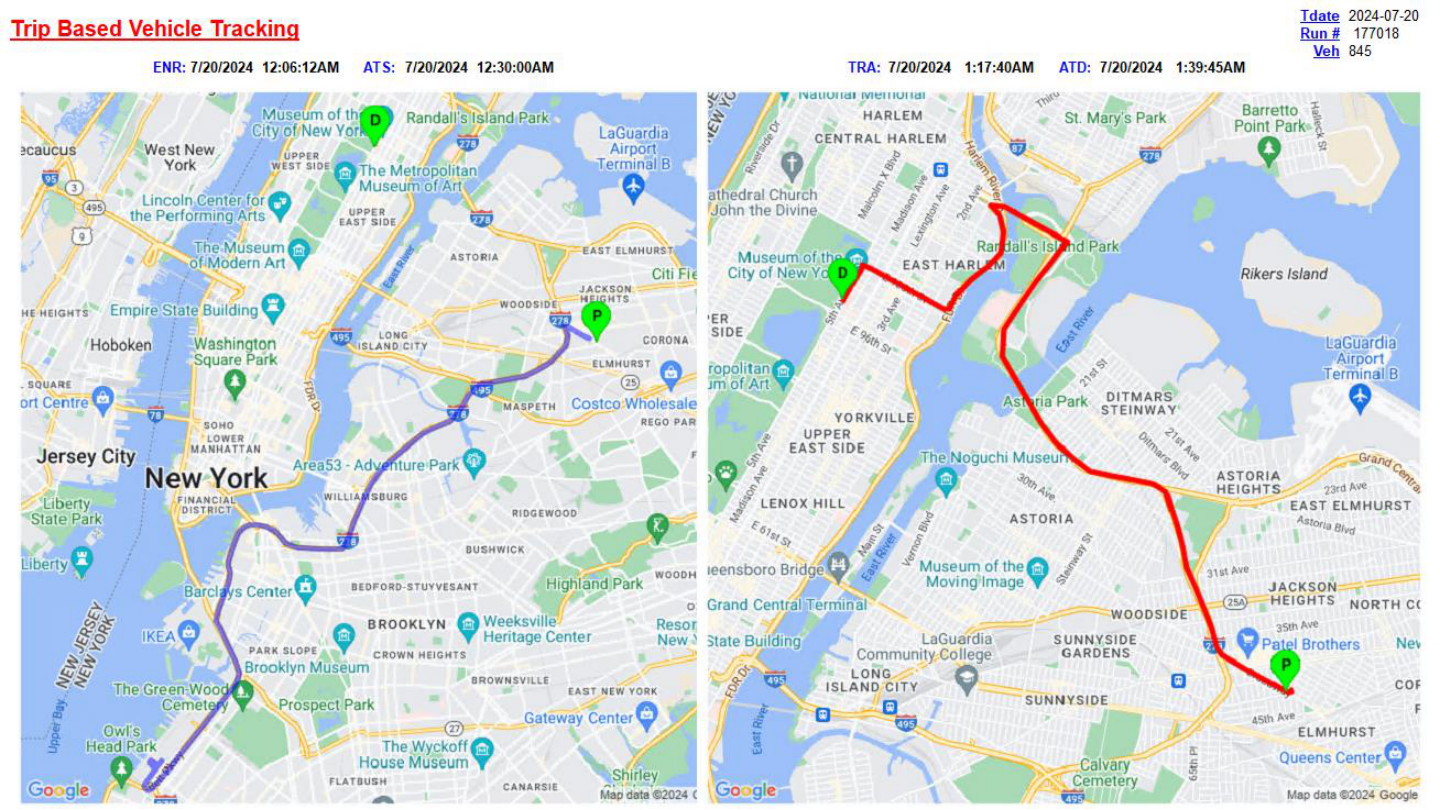
When investigating a specific trip — whether for a response time complaint, a billing audit, or a crew performance review — being able to visualize the actual vehicle path provides clarity that timestamps alone cannot. This use case renders two maps side by side for a single trip:
- Left map: The en-route leg, from the unit's starting location to the pickup address, with a marker for the pickup point (P).
- Right map: The transport leg, from pickup to drop-off, with markers for both pickup (P) and destination (D).
Rather than cluttering the map with individual AVL data points, a path-style rendering is used — all captured GPS coordinates connected by a continuous line. Each leg uses a dynamically assigned color to visually distinguish the two portions of the trip at a glance. Most research requests involve only one of the two legs, but both can be displayed together when a full-trip view is needed.
Client-Facing Static Location Map with Google ETA
Contracted hospital accounts and municipal clients often want the ability to track an incoming ambulance without having direct CAD access. This use case serves that need with a static, on-demand location map embedded in a client-facing web dashboard.
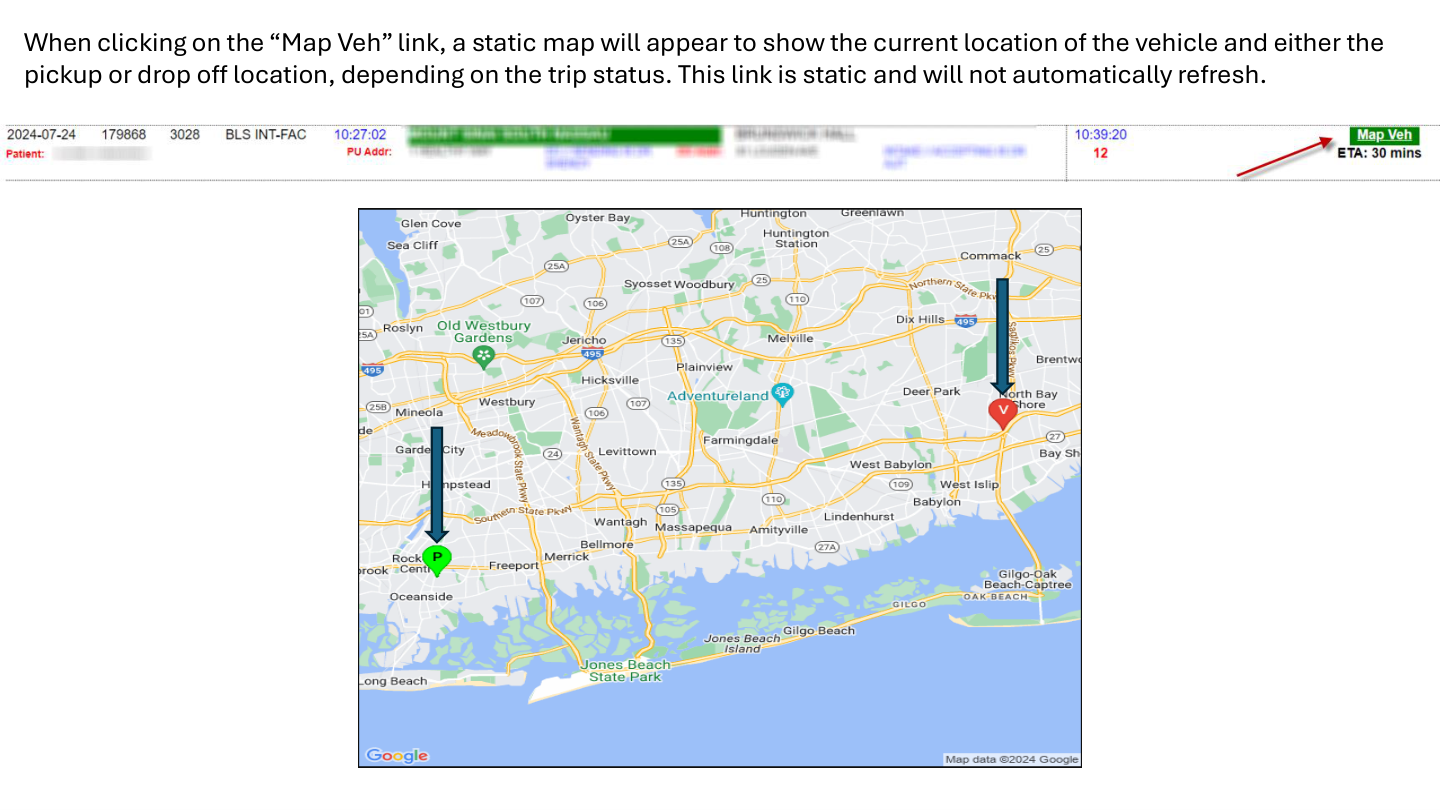
Each active trip — provided the vehicle is moving and trackable — includes a "Map-Veh" link. Clicking it opens a new tab with a static map showing:
- Current vehicle location, marked as V
- Either the pickup location (P) or the drop-off location (D), depending on the trip's current status
- An ETA derived directly from the Google Maps API — significantly more accurate than the CAD system's straight-line calculation
The map does not auto-refresh. Each click on the "Map-Veh" link generates a new, updated snapshot. This keeps the implementation lightweight while still giving clients accurate, on-demand information.
Live Vehicle Tracking for End Users
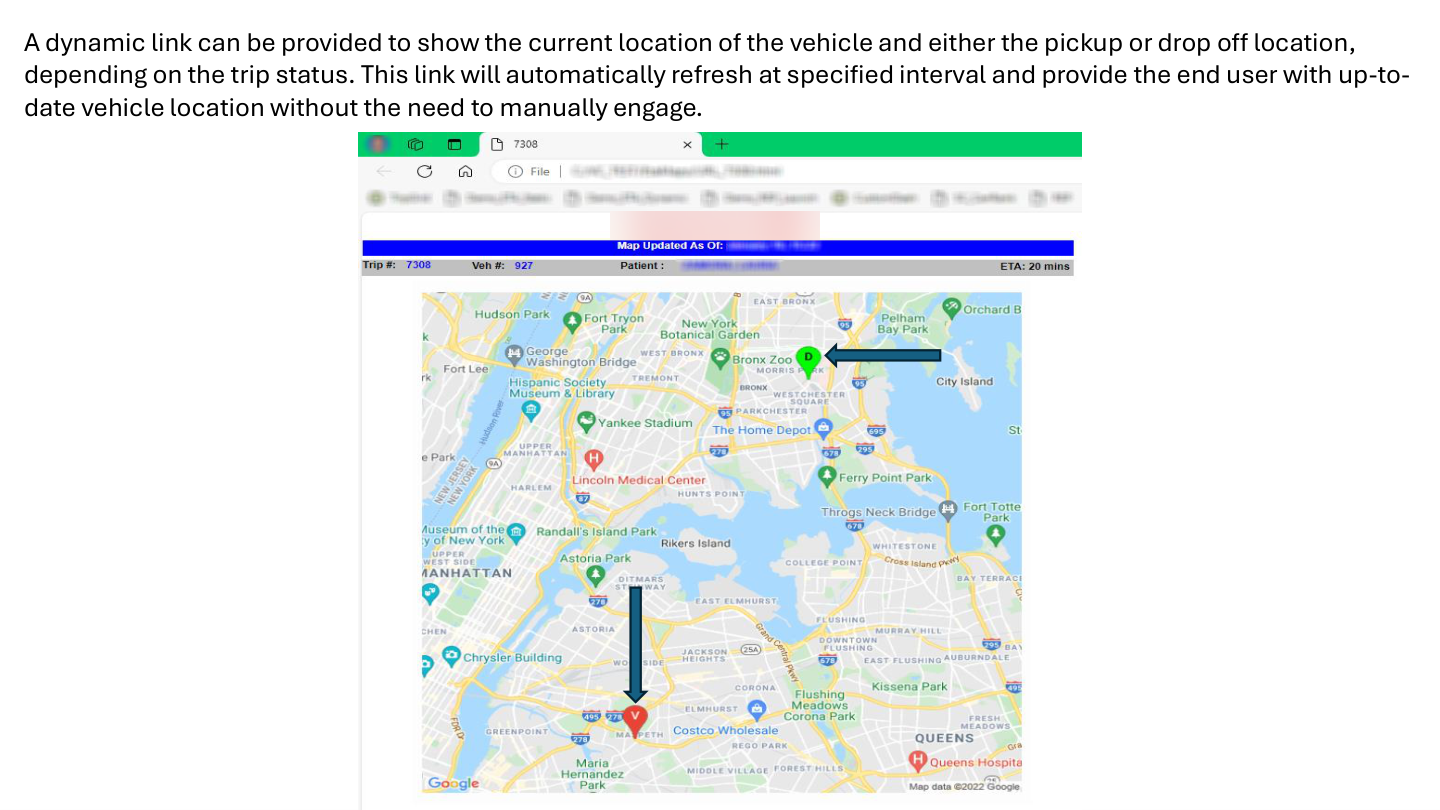
Where the static map provides a snapshot, this use case provides a continuously updating view. The dynamic tracking map functions similarly to the link a rideshare app sends when your driver is en route — the vehicle marker moves closer as the map auto-refreshes at a configurable interval.
The map always displays the time of its last update and the current Google-calculated ETA, giving the viewer both live location context and an arrival estimate that updates with each refresh. This is typically used for internal operations staff or dispatch supervisors who need to monitor a specific vehicle without querying CAD repeatedly.
Candidate Ranking Map — Visual Vehicle Recommendations
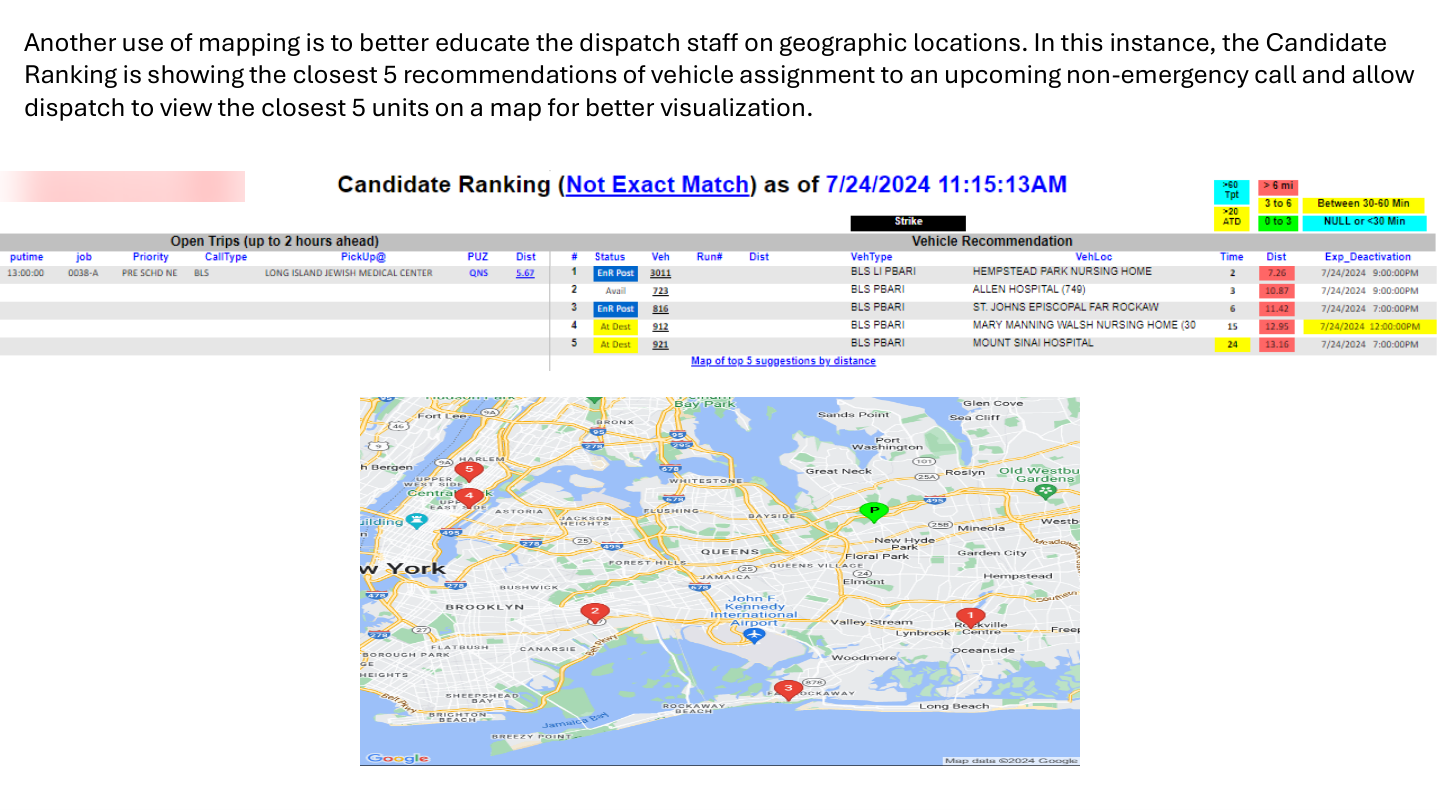
The custom candidate ranking process discussed in a separate post generates vehicle recommendations based on distance and availability. When a dispatcher wants to visually confirm the location of the top recommended units, a clickable map link provides exactly that.
For upcoming pre-scheduled trips, the system projects each recommended vehicle's anticipated location — using the drop-off address of its current active assignment if it is en route, or its actual GPS position if it is available. Clicking the map link opens a static map showing:
- The pickup location for the upcoming call
- The five recommended vehicles, plotted by their distance-based ranking number (1 through 5)
This is particularly useful when a dispatcher is uncertain about the geographic context of a recommendation — a number on a ranked list tells you relative distance, but a map tells you whether the vehicle is across a river, on the wrong side of a highway, or positioned perfectly.
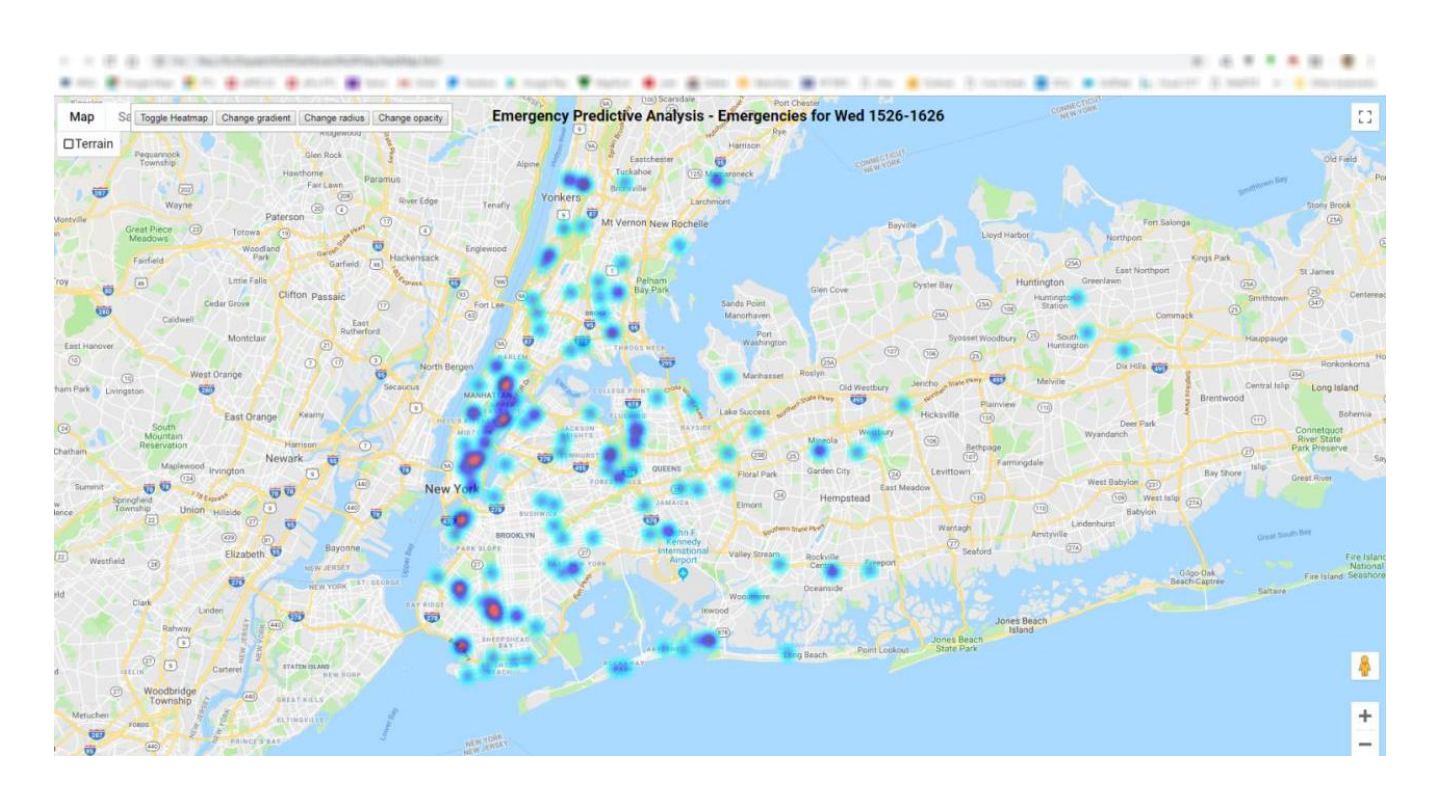
Predictive Call Origin Heatmaps for Vehicle Posting
The final use case shifts from reactive to proactive. Rather than showing where vehicles are or where calls are happening now, this heatmap projects where emergency calls are statistically likely to originate — giving dispatch a basis for posting decisions before the calls come in.
The underlying logic analyzes historical call data for the same day of week and the same 30-minute window, looking back across the past 12 weeks. The resulting heatmap visualizes call density by origin location, surfacing clusters that suggest where new calls are most likely to emerge in the near future.
Overlaying available vehicle positions against a live heatmap allows dispatch supervisors to proactively reposition units toward high-probability zones — reducing response times before a call is even received.
Putting It Together
These five use cases are not a single integrated product — they are individual tools built incrementally based on operational needs. Each one requires only a Google Maps API key and access to your existing location data. The implementation complexity ranges from straightforward (the static maps) to moderately involved (the heatmap with historical aggregation), but none requires specialized GIS software or external data services.
If your operation is already capturing AVL data and running SQL-based reporting, you likely have everything you need to build at least the first two or three of these tools today.
Interested in Mapping Tools for Your EMS Operation?
DataAuthenticity LLC builds Google Maps API integrations, dispatch intelligence dashboards, and AVL-based reporting tools for EMS agencies. If you have location data in your system, there is almost certainly more value to extract from it.
Start a Conversation