EMS Business Continuity
How to Keep EMS Dispatch Running During a RescueNet Outage
System outages happen. Whether it's a database connectivity failure, a hard drive issue, or a network interruption, the moment RescueNet goes down, dispatch loses visibility — no job board, no resource tracking, no ability to follow active trips. Over nearly 14 years supporting EMS dispatch operations, a lightweight backup process has been developed and refined that restores dispatch visibility within minutes, using tools already available in most EMS environments: Crystal Reports and Excel.
The Goal: Restore Dispatch Sight, Fast
The core concept is straightforward — create a continuously refreshed, offline-capable data source that sits completely outside the scope of SQL Server and RescueNet. When the primary system fails, dispatchers can immediately run two Crystal Reports to see every active trip and every available vehicle, without waiting for IT to restore connectivity.
This approach is built on three assumptions about your environment:
- You have an existing paper trip sheet used during system outages (with labeled fields for dispatch staff to fill in manually).
- You already have an automated data extraction process for reporting purposes, with the ability to save extracts to a local file path.
- You have a Crystal Report viewer available for dispatchers to access without the full application.
If those three conditions are met, the following five-step process can be implemented relatively quickly.
The Five-Step Implementation
Step 1
Prepare Your Data Sources
Trip data: Using your paper trip sheet as a field guide, identify which data points are needed and build a Crystal Report pulling those fields. Export it to an Excel file. You can start conservatively and add fields as you go. Consider whether to include completed calls or only assigned and open ones, and how far back in time to look.
Vehicle data: Build a separate report capturing all vehicles currently not on active calls — units that are out of service, at post, doing a weather check, en-route back to base, and so on.
Step 2
Build Your Backup Trip Sheet Report
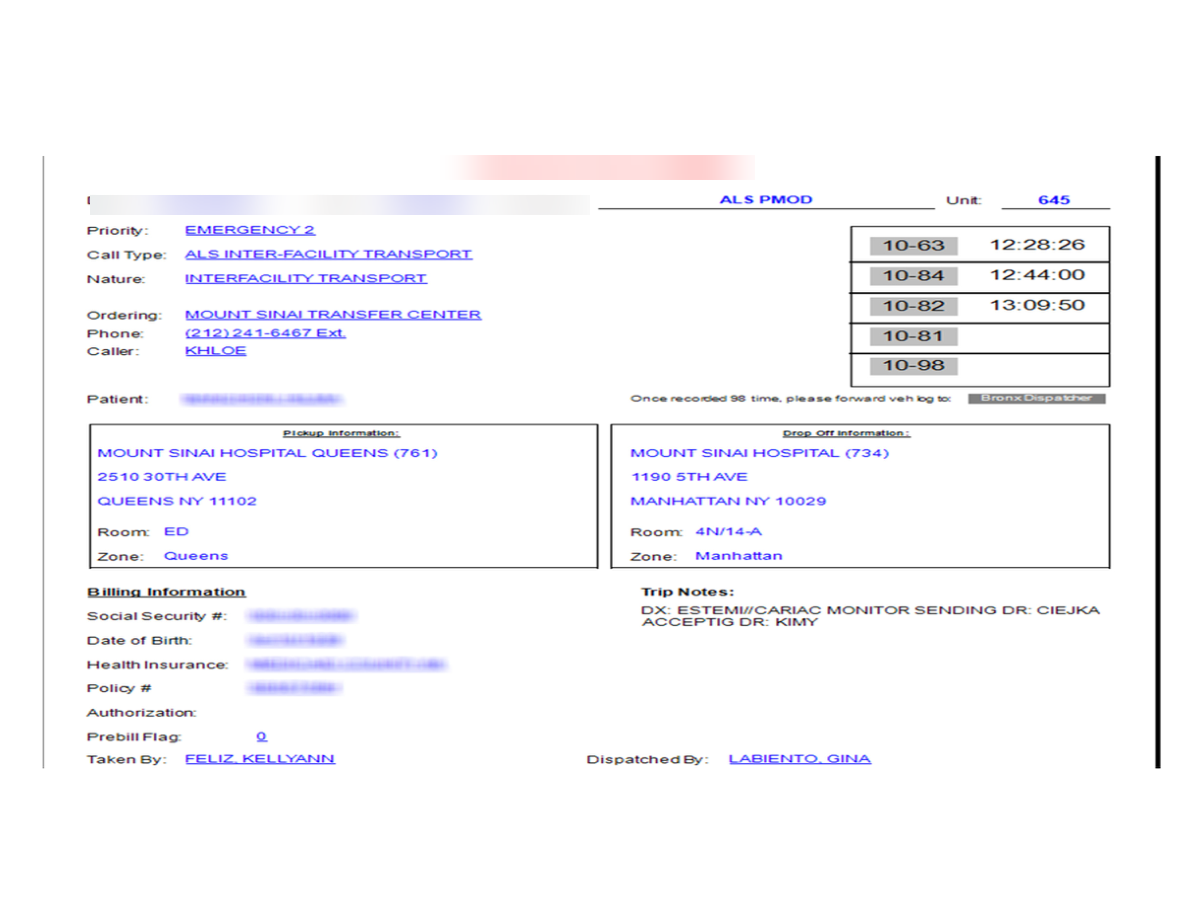
This Crystal Report uses the trip data extract from Step 1 as its source. Format it to mirror your existing paper trip sheet as closely as possible — familiar layout reduces friction for dispatchers under stress. Each record in the output will correspond to one active trip.
Step 3
Build Your Vehicle Availability Report
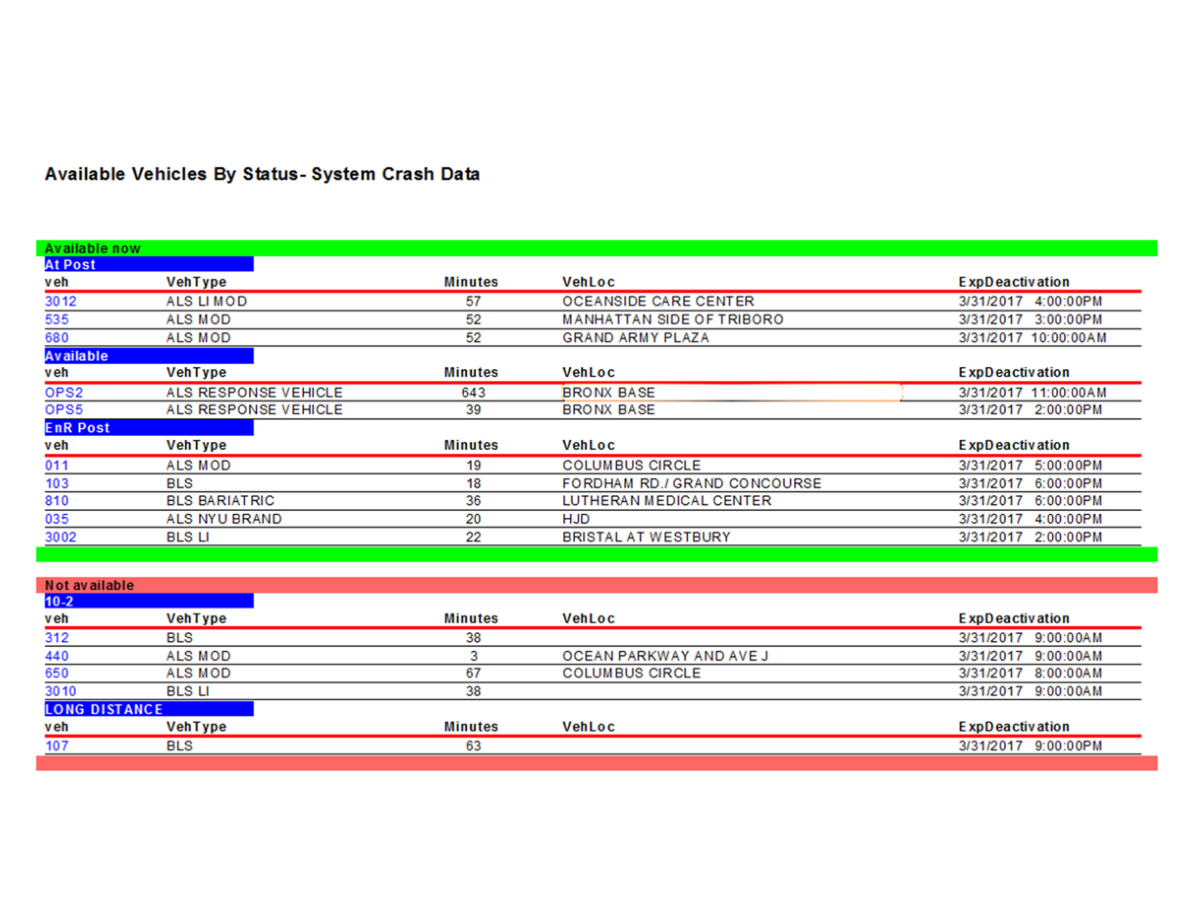
This Crystal Report uses the vehicle data extract from Step 1. Its purpose is to give dispatch an instant read on which resources are available for assignment. Keep it simple and scannable — unit number, status, location.
Step 4
Automate the Data Refresh
This is the most important step. The entire system depends on data sources that are continuously updated. Use your existing extraction tool to refresh both files every N minutes — frequency depends on your system's capacity, but every 3 minutes is a practical and manageable interval for a dataset of 500–600 trips.
Important: Avoid overwriting files directly in the location dispatchers access. If a dispatcher opens a file and leaves it locked, the next automated write will fail silently. Instead, write to a staging location and batch-copy to the destination — or use a sync tool — to minimize that risk.
Step 5
Train Dispatch to Use It
In the event of a system outage, dispatchers open the Crystal Report viewer and run the two reports manually. The trip report generates one page per active or open trip. The vehicle report produces a single-page summary of available resources with their current locations. Total time from outage to restored visibility: under two minutes.
An Added Layer: The Dispatch Dashboard as Backup
In practice, this backup system is supplemented by a live dispatch dashboard that incorporates a custom candidate ranking report. That dashboard runs independently of RescueNet's interface and serves double duty — as a coaching tool for better vehicle utilization under normal conditions, and as an additional fallback resource during an outage.
What You Need to Build This
- Crystal Reports (and a viewer for dispatch workstations)
- An existing automated data extraction process (SQL query or RescueNet extract)
- Excel (as the data source file format)
- A scheduled task or automation tool to run extracts every few minutes
- A file sync or batch copy mechanism to avoid file-lock conflicts
No additional software licensing is required. The entire system runs on tools most EMS operations already own.
Need Help Building This for Your Agency?
DataAuthenticity LLC designs and implements Crystal Reports-based dispatch tools, automated data pipelines, and business continuity solutions for EMS and 911 agencies. Reach out to discuss your environment.
Start a Conversation