Dispatch Optimization & Accountability
Real-Time EMS Dispatch Recommendations and After-Action Review: A Complete System
At the center of any well-performing ambulance service is dispatch. Dispatchers monitor a constantly moving job board and are expected to make fast, accurate vehicle assignment decisions — often under pressure, with imperfect information. Not every decision is optimal, and the gap between a good assignment and a poor one can mean the difference between meeting a response time benchmark and missing it. This post describes a complete system built to support dispatchers in real time and to give operations teams the data they need to review past decisions objectively — without blame, and with the goal of continuous improvement.
Part 1 — Live Dispatch AssistanceWhy Build a Custom Candidate Ranking Tool?
RescueNet includes a built-in candidate ranking feature, and it works for basic use. However, a custom approach becomes necessary when the operation requires capabilities that the native tool does not support, including:
- Pre-assignment for scheduled calls — recommending vehicles based on where they will be once their current trip ends, not just where they are now.
- Level-of-service filtering — preventing the system from recommending a BLS unit for an ALS call, or a non-bariatric vehicle for a bariatric transport.
- Crew schedule awareness — factoring in shift end times to avoid inadvertent overtime.
- Custom refresh rate — running as frequently as the logic allows, rather than on a fixed system interval.
The primary advantage of building this independently is that it can run automatically at a fast refresh rate and deliver recommendations the moment conditions change — a new call drops, a unit clears, a pre-assigned resource changes status — all handled without dispatcher intervention.
The Live Assistance Dashboard
The live assistance tool is a browser-based dashboard, accessible on any workstation connected to the internal network, that self-refreshes every 3 minutes. The layout is designed for fast visual scanning at a glance:
- Left side: Open (unassigned) calls currently on the board.
- Right side: Up to five vehicle recommendations per call, sorted by distance to the pickup location.
The dashboard is divided into two sections: Exact Match and Not Exact Match. An exact match means a recommended vehicle will finish its current trip at the same facility where the open call originates — a perfect pre-assignment opportunity that eliminates an unnecessary trip from further away.
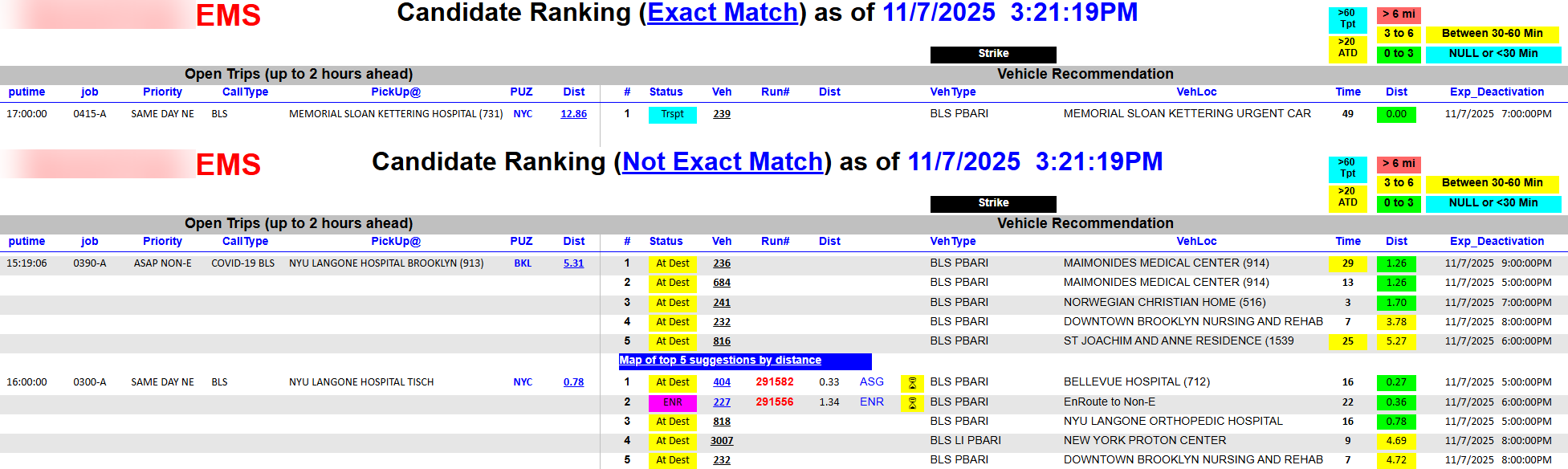
For example: an open call is scheduled for a 17:00 pickup at a hospital. A recommended vehicle is currently transporting a patient into that same facility. The dashboard surfaces this match automatically, allowing the dispatcher to pre-assign that vehicle and avoid sending a unit from further away — reducing unnecessary mileage, fuel usage, and accident exposure while protecting on-time performance.
When a recommended vehicle is already pre-assigned to another call, that information is displayed as well, giving the dispatcher the context to weigh one assignment against the other.
Part 2 — Historical Decision Review
Turning the Live Tool into an After-Action Record
The same logic that powers the live dashboard can be repurposed to create a historical record of what recommendations were available at the time of each dispatch decision. This is the foundation of the after-action review process — what might be called "Monday morning quarterbacking," reframed as a coaching and mentoring tool rather than a disciplinary one.
A modified version of the dashboard, narrowed to emergency calls only and formatted to a custom page size, runs on the same 3-minute cycle. For each open emergency call, it bursts a PDF export capturing the recommendations available at that moment. At the same time, it inserts the same data into a custom database table for later reporting use.

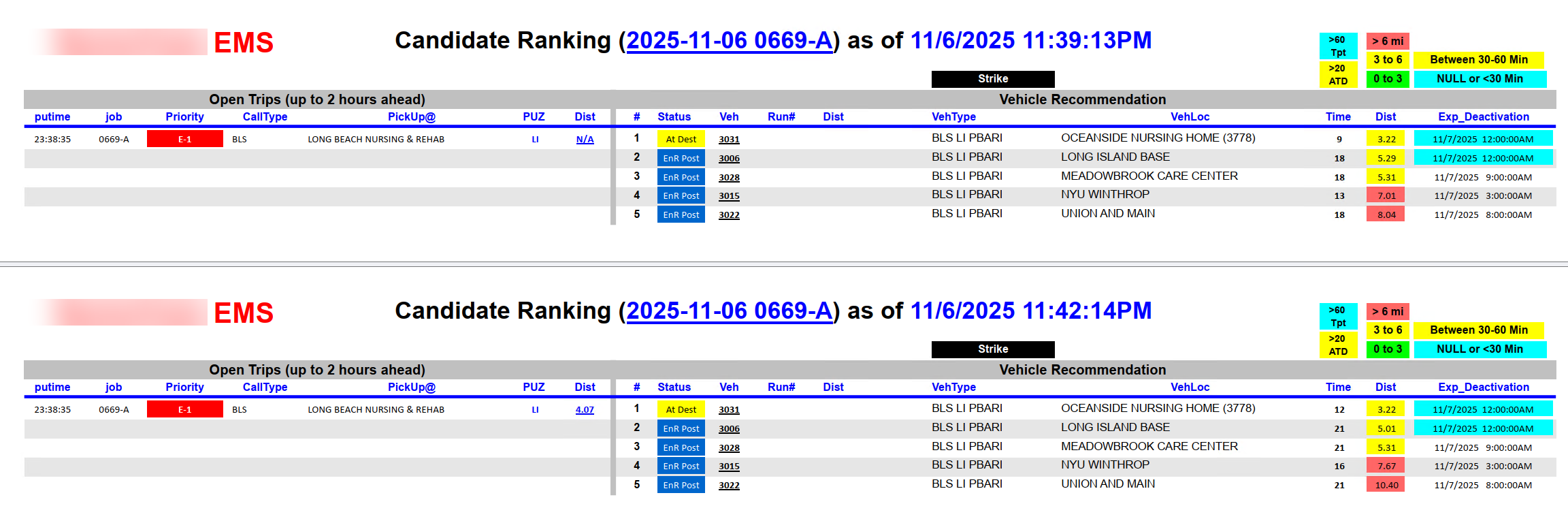
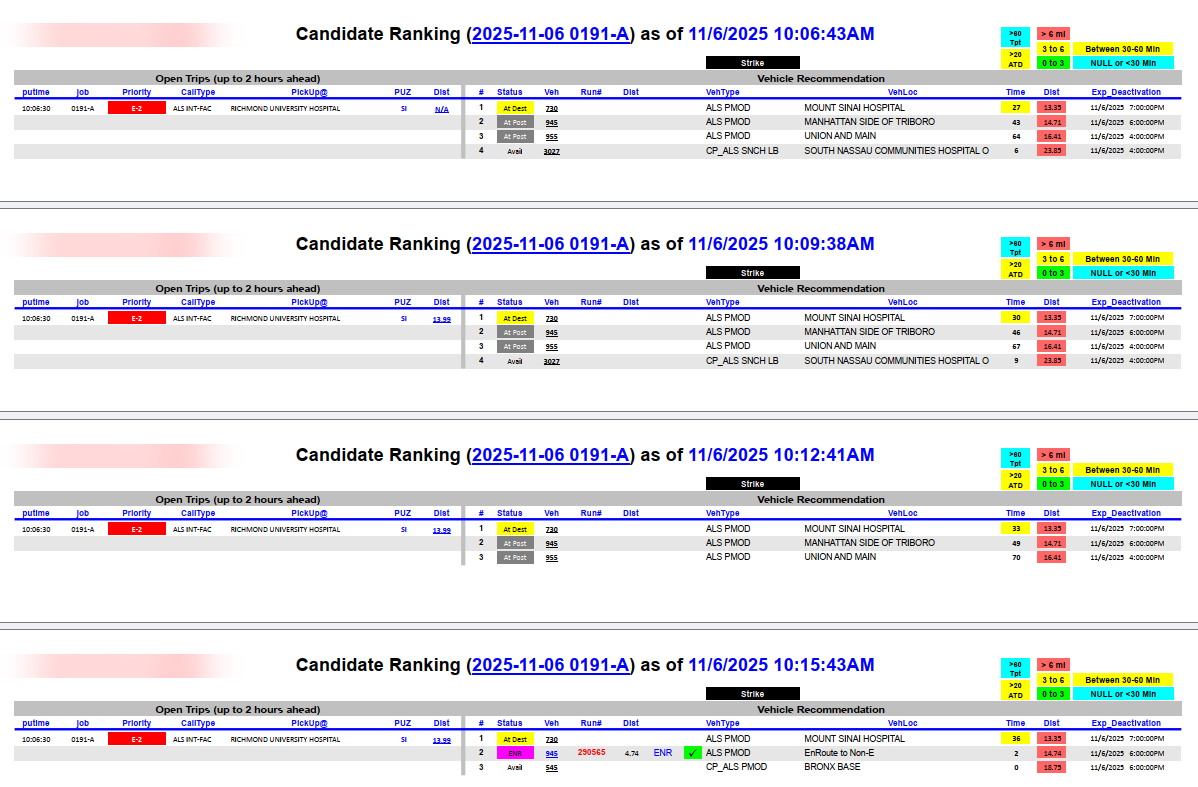
Because the process runs every 3 minutes and the board is dynamic, multiple extracts are often generated for the same open trip as conditions evolve. Each extract is timestamped to keep them distinct:

A secondary process then merges all individual extracts for the same trip into a single consolidated PDF file:
Embedding Reviews in Operational Reports
The main reason for building a merged PDF workflow is reviewability. Looking back at a dispatch decision historically meant manually pulling records from CAD — a time-consuming process that produced a broad board view, not the specific detail relevant to one call. The merged PDFs solve that by containing exactly what recommendations were available when the assignment was made.
These PDFs are embedded directly into operational performance reports. When a report flags calls that missed response time benchmarks, the embedded PDF is attached as a paperclip annotation on the relevant call record:

This creates a direct line between a missed metric and a reviewable record of what alternative assignments were available at that moment. The conversation with dispatch shifts from "why was response time poor?" to "here's what was available — let's discuss the decision."
The Database Layer: Structured Data for Ongoing Analysis
Because every recommendation generated is simultaneously captured in the database, the data is also available for structured reporting outside of the PDF workflow. This enables aggregate analysis — patterns in vehicle selection, recurring misses, training opportunities across shifts or supervisors:

Part 3 — Vehicle Research Dashboard
Researching What the Recommended Vehicle Actually Did
The after-action review process raises a natural follow-up question: if the recommended vehicle wasn't assigned to the open call, what was it doing instead? There is always a possibility that a vehicle was assigned to a comparable call, or had to handle an emergency elsewhere. Evaluating a dispatch decision fairly requires answering that question.
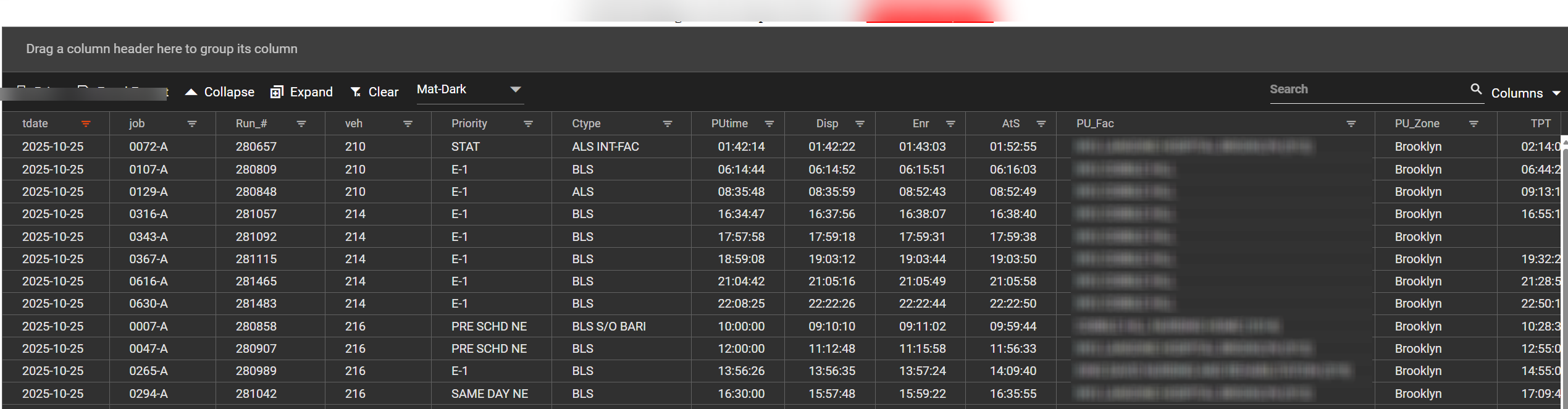
Pulling that information manually from CAD for multiple vehicles across a full shift is impractical. The vehicle research dashboard addresses this by providing an interactive, filterable view of two weeks of trip data — queryable by date, vehicle, and any combination of columns.
Example: Researching Three Recommended Vehicles
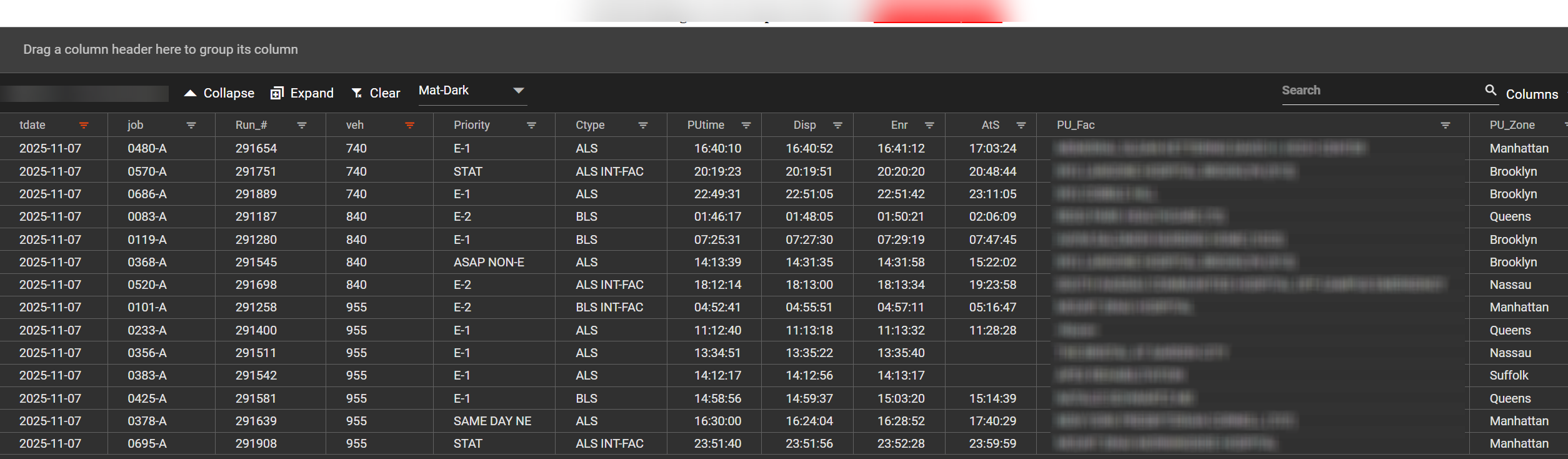
Starting from a recommendation extract for a specific trip, suppose the reviewer wants to understand what vehicles 840, 955, and 740 (the top three recommendations) were doing that day:
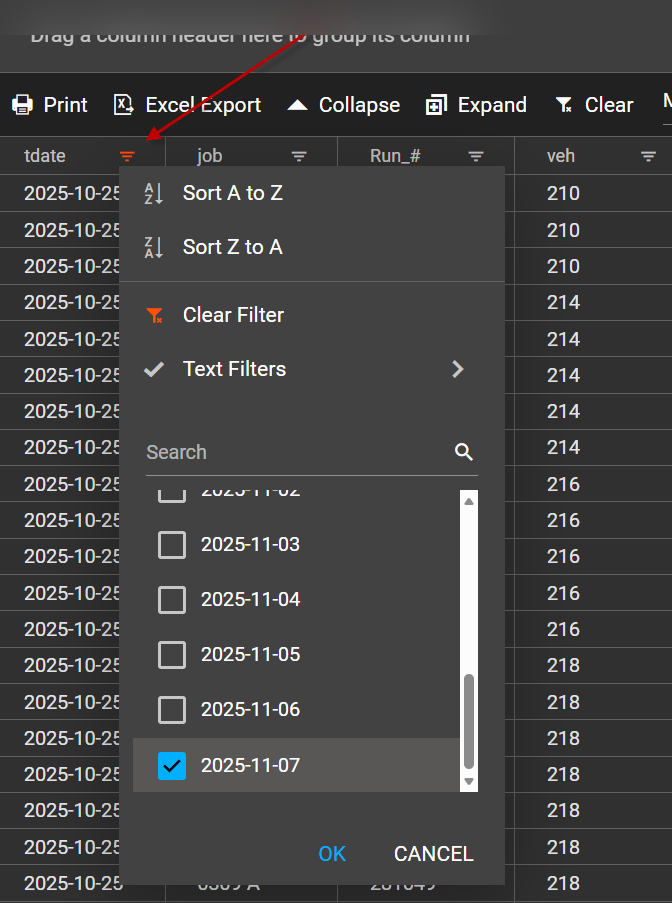
- Filter the date column to the date of service.
- Filter the vehicle column to select units 840, 955, and 740.

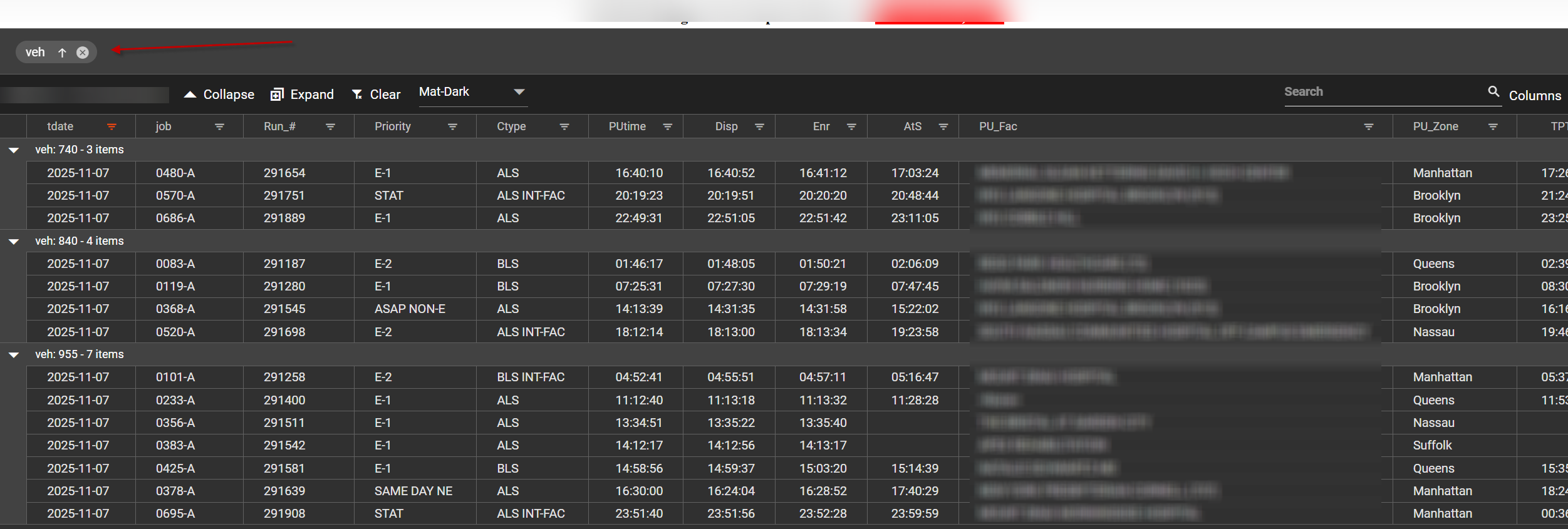
For easier comparison, the vehicle column can be dragged to the grouping area to organize results by unit:
Fully Personalized Views
The dashboard behaves like an interactive spreadsheet: columns can be filtered, sorted, rearranged by drag-and-drop, and toggled on or off. Each user's configuration is saved in their browser cache, so multiple people can work from the same data source simultaneously with their own personalized view — without affecting anyone else's layout.
Looking to Build This for Your Operation?
DataAuthenticity LLC has implemented dispatch recommendation systems, historical review workflows, and accountability dashboards for EMS agencies and 911 operations. Every system is built around your existing data — no third-party platforms or subscription fees required.
Start a Conversation